
Software for PTC Windchill & Creo
Applications that automate, integrate, and extend PTC Windchill & Creo capabilities.

Software for PTC Windchill

Software for PTC Creo
Software for Compliance Map
Unparalleled all-in-one Environmental Compliance Platform to drive all your regulatory obligations from Product Compliance, Extended Producer Responsibility to Supply Audit Management, Conflict Minerals and more.

Mindbreeze for Windchill

LinkAccess MBE is Fishbowl Solutions’ newest software release. LinkAccess MBE allows the user to see the viewable and interact with the model in a 3D space. View, pan, zoom, change presentation states, read model attributes and notes, and see semantic highlighting for individual parts and assemblies.
Value-Add Software for PTC Windchill
LinkAccess
Available in two modes—Interactive and Trigger—LinkAccess allows companies to collaborate more effectively and efficiently by providing easy, secure access to valuable product data that resides in Windchill. The various modes automate the transformation of data into desired formats such as PDF, DXF, STEP, etc. based upon actions like Windchill event triggers and workflow robots.
LinkLoader
LinkLoader automates the bulk loading of data into Windchill. Data could include CAD files (such as Creo, SolidWorks, AutoCAD, and Inventor), documents, or WTParts. LinkLoader can batch load from network file folders or third-party PDM systems (such as PDMWorks, EPDM, and TeamCenter).
Data Clean Up Tools
Fishbowl has a suite of tools to address data cleansing requirements. Our tools execute mass updates to revisions, lifecycles, instance based attributes, name, numbers, and more for WTDocuments, WTParts, and EPMDocuments within Windchill.
Microsoft Teams App for PTC Windchill
This app allows users to seamlessly share documents between MS Teams and PTC Windchill. This helps to address a common business problem where sharing documents between the two systems can be cumbersome, time-consuming, and error-prone. The app leverages the permissions within both systems to ensure secure document sharing and streamlines the document collaboration process.
System Generated Drawing Automation
Dynamically create PDF specification sheets and/or stamped drawings that can include associated document content and system information such as Windchill Part Attributes and BOM information. This is a compelling software solution for PTC Windchill that will save engineering teams substantial time and money.
LinkPortal
Fishbowl Solutions’ LinkPortal is a web-based application that is designed to provide simple, secure access to Windchill data. Access can be controlled in various manners to help facilitate collaboration with downstream workers and suppliers.
Applications for ThingWorx
Inspection Report Automation
Automatically creates inspection report spreadsheets, including all dimensions, tolerances, and notes, based on your Creo drawings. You will be able to automate a manual and error-prone process with simple point and click events that work with created and shown dimensions and inspection dimensions. Export geometric tolerances, drawing notes, including drawing sheet and zone information.
LinkAccess Model-Based Enterprise (MBE)
A publishing solution designed to create drawings and convert to 3D PDF files. LinkAccess MBE allows the user to see the viewable and interact with the model in a 3D space. View, pan, zoom, change presentation states, read model attributes and notes, and see semantic highlighting for individual parts and assemblies.
DXF Flat Pattern Automation
Are you spending a lot of time creating DXF flat pattern files for downstream sheet metal manufacturing processes? This tool helps CAD users create a 1:1 DXF flat pattern from every sheet metal part in an assembly quickly. This tool drastically reduces errors caused by manual work. Save time and remove the burden of flat pattern creation from CAD users.
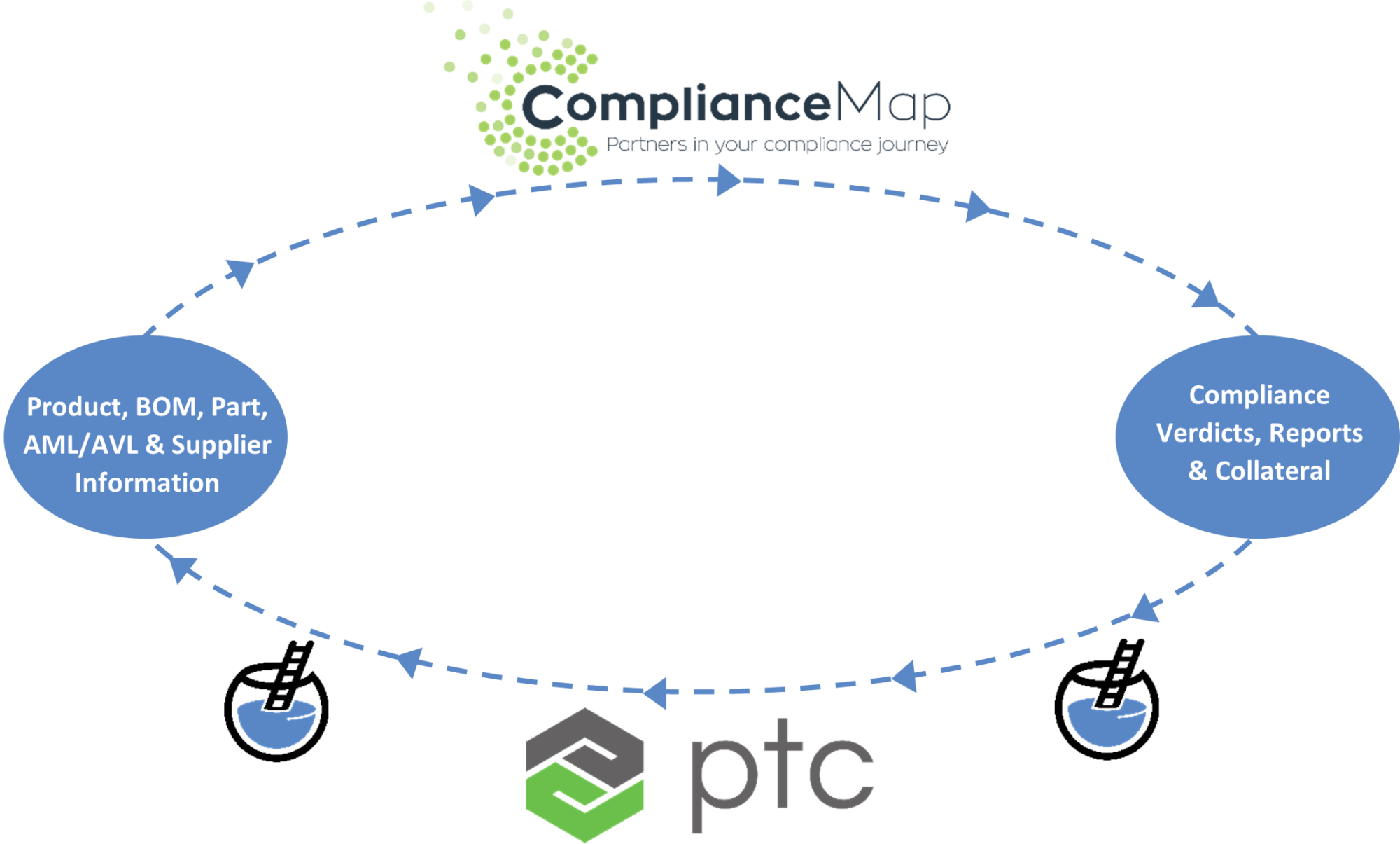
PTC Windchill Connector for Compliance Map
Integrate Windchill with Compliance Map
Automate your company’s product compliance and supply chain obligations
The unparalleled software eco-system drives your data collection, management and reporting needs relating to Environmental Compliance Directives and standards, Extended Producer Responsibility Regulations, Conflict Minerals, Responsible Sourcing Audit Management and much more.
Complete indexing for PTC Windchill.
Windchill security. We've got you covered.
Intelligent content feeding. Intuitive content finding.
Want to know more?
Send us a note. We’d be happy to answer your questions or give you a demo.
