
Software for Oracle WebCenter Content
We don’t make WebCenter. We make WebCenter better.
At Fishbowl Solutions, we’ve been helping customers get the most out of Oracle WebCenter Content for nearly two decades. We specialize specifically in WebCenter and our roots go back to the days of UCM, Stellent, and even Xpedio. We know the Content Server inside and out. All of that experience gives us the insight and know-how to create plug-and-play add-on software products for Oracle WebCenter Content that solve common problems.
Proven Solutions
Updates & Enhancements
Support
Generative AI
Fishbowl’s Generative AI for Oracle WebCenter Content transforms enterprise content interaction. With advanced semantic search, Retrieval-Augmented Generation (RAG), and generative AI, your organization can streamline content retrieval and utilization while adhering to existing document access permissions.


NEW RELEASE: Microsoft Teams for Oracle WebCenter Content Integration
Fishbowl Solutions’ new MS Teams App for Oracle WebCenter transforms enterprise collaboration by bringing content management directly into Microsoft Teams. Users can now edit, share, and govern WebCenter content securely—without ever leaving Teams.
ControlCenter
ControlCenter is an all-in-one solution for managing controlled documents within Oracle WebCenter Content. It simplifies compliance by automating document review cycles, maintaining complete workflow and audit histories, and ensuring version accuracy across your organization. With its modern, responsive interface, users can easily manage policies, procedures, and work instructions from any device — helping teams stay compliant, connected, and audit-ready at all times.


Document Assembly
Save time in creating master documents or manuals, as well as ensure the contents of such documents are managed as individual items instead of having to manage/revise multiple content items. Easily search, select, order, and assemble the contents of a manual in a matter of minutes with ensured document integrity and version control.
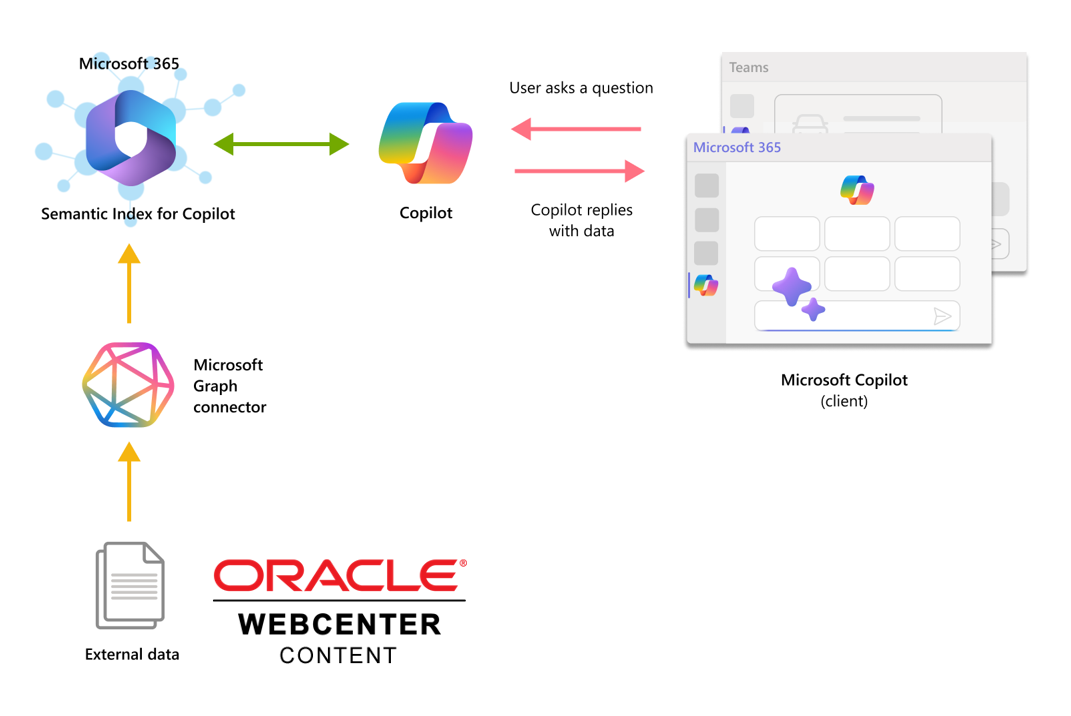
Oracle WebCenter Content Connector for Microsoft Graph
A powerful solution designed to integrate Oracle WebCenter Content with Microsoft 365. This connector enables organizations to leverage the full potential of their document management systems while maintaining the robust features and security of WebCenter Content.

Admin Suite
Admin Suite is a collection of our most popular add-ons for Oracle WebCenter Content. Simplify security mapping and reduce LDAP maintenance with our powerful rules engine. Automate check-ins from systems like ERP and CRM. Send automatic email notifications. Change metadata based on rules. Streamline workflows. And so much more.
The tools you need to keep WebCenter running like a charm.
Advanced User Security Mapping
WebCenter security administration has never been easier. A robust rules engine maps any combination of LDAP attributes to WebCenter roles so you don’t need dedicated groups for every permission level. Permission audit lets you see exactly who has access to a specific security group or account. And the user evaluation tool clearly traces permissions for any user.
CADConverter
Automatically convert AutoCAD drawings to web-viewable DWFs or PDFs upon check in. Hundreds of configuration options give you the flexibility you need. Force specific plot styles. Adjust line weights. And so much more. Managing AutoCAD drawings in WebCenter Content has never been easier.
Document Automation Suite
Document Automation Suite integrates the authoring process with WebCenter Content. Wondering what changed between two document revisions? Easy. We’ve integrated directly with Microsoft Word comparison. Eliminate duplicate data entry and reduce human error by syncing properties between native documents and WebCenter metadata.
Enterprise Batchloader
ERP. CRM. CAD systems. We’ve got you covered. Enterprise Batchloader gives you an automated integration point between countless third party software. The batchloader watch directory automatically loads content based on your defined output schedule. And an extensible pre-processor enables metadata mapping for greater business insight.
Office Online Server Connector
No more check out/in screens with metadata forms. No more downloading, saving, and editing documents outside of WebCenter. Just simple and familiar ways to access, edit, and collaborate on Microsoft Office content while maintaining WebCenter version control.
Mindbreeze InSpire Enterprise Search Appliance Connector
Trouble finding something you checked in? Use the Mindbreeze InSpire Enterprise Search Appliance to make searching WebCenter Content easy and relevant. Complex WebCenter security? No problem. Our connector supports an array of security configurations so you can maintain access controls.
Subscription Notifier
Automate WebCenter in countless ways with Subscription Notifier. Send sales a weekly list of updated materials. Notify marketing if web content is getting old. The flexible setup lets you target the right content at the right users on your schedule. Plus, query-based jobs target desired content and automatically perform actions like deleting old revisions or updating metadata.
Workflow Solution Set
Enhance WebCenter workflows with Workflow Solution Set. Easily see remaining reviewers and workflow status. Search documents in workflow. Sort and filter workflow lists. And automatically renotify reviewers based on scheduled timeouts. With Workflow Solution Set you’re in control. Workflow history is no longer buried in the database. Users can view complete history right from the content info page.
Don't see what you're looking for?
Drop us a line. We’ve done hundreds of projects. Chances are whatever it is you’re looking for… we’ve seen it before. We’d be happy to explore together whether a software product or customization for Oracle WebCenter Content might be the right fit.
